SketchUp Kitchen Models: Cabinets, Islands and Dining Sets That Render Well
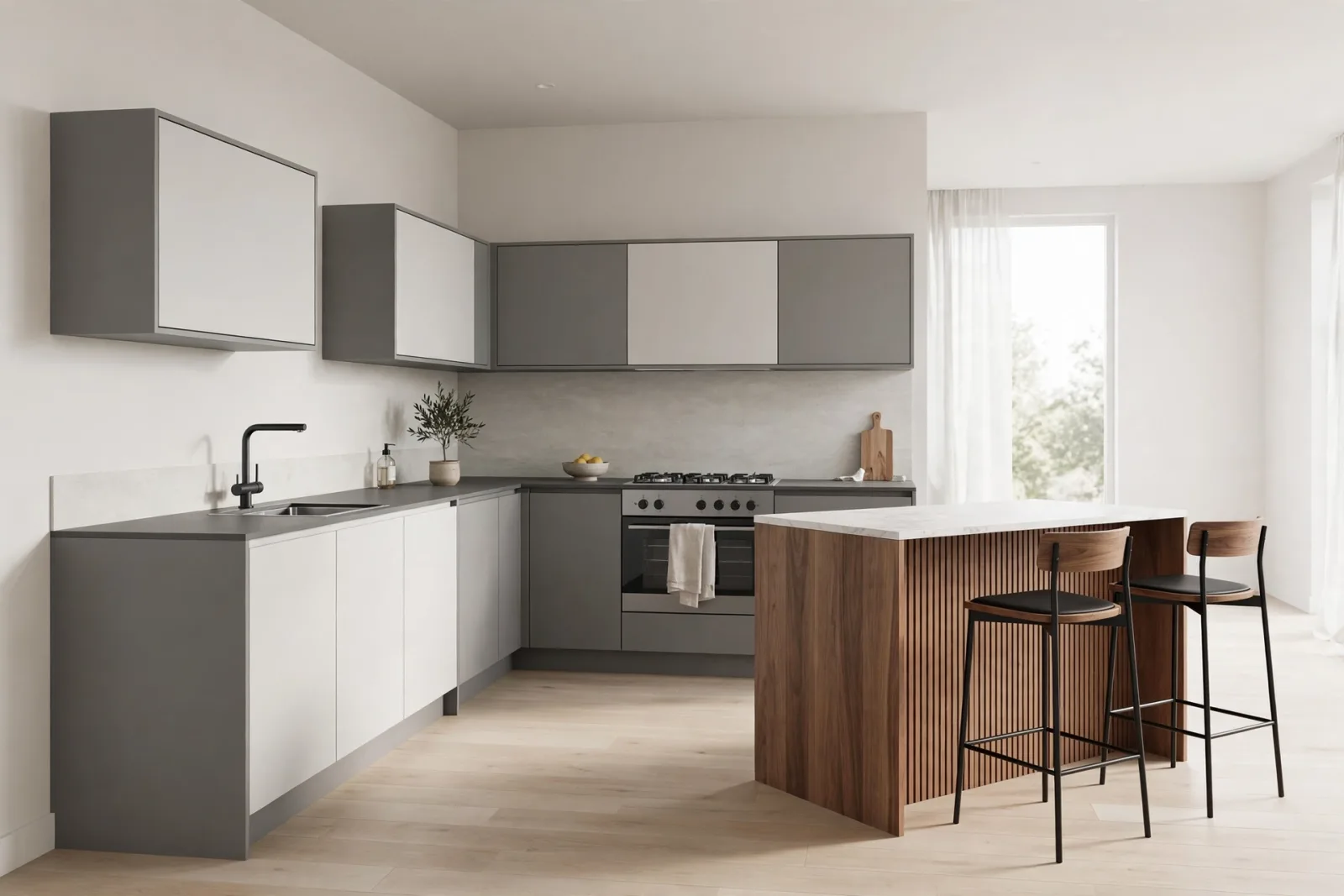
Kitchens are where SketchUp models either prove their worth or quietly wreck your render. A kitchen scene packs more small components than any other room: cabinet carcasses, doors and drawers, handles, countertops, appliances, sinks, islands, seating. Download a sloppy set of sketchup kitchen models and you inherit every mistake twice, once in your modeling session and again in your render queue.
This guide walks through how to pick kitchen models that actually behave in SketchUp and in renderers like V-Ray and Enscape. You will learn what separates a clean cabinet component from a polygon disaster, which pieces a finished kitchen needs, and where to find curated models that save hours of cleanup.
Why Kitchen Models Are Harder Than They Look
A sofa is one component with a few materials. A kitchen is an assembly of dozens of interlocking parts. Handles repeat hundreds of times, drawer boxes nest inside cabinet carcasses, and every toe-kick, filler panel and end panel has to align. If each of those parts comes from a different 3D Warehouse upload, your model ends up with:
- Conflicting component names that collide when you copy parts between files
- Mismatched material naming, so your white shaker door and your white end panel are two different whites in the renderer
- Varying origins and scales, which makes snapping cabinets into a run along a wall a guessing game
- Inconsistent levels of detail, so the refrigerator has 40,000 polygons while the sink is a flat box
A coordinated kitchen set built as one family solves all of this at the source. The components share naming, share materials, and sit at sensible origins. The Complete Kitchen Set, an L-shape with island, is a good example of this approach: cabinets, appliances, sink and island were modeled to fit together, not gathered from ten different authors.
What a Complete Kitchen Component Set Needs
Before you download anything, make a checklist. A kitchen worth rendering needs, at minimum:
- Base cabinets in standard depths, with doors and drawer fronts as separate, grouped geometry so you can edit hardware or swap fronts without exploding anything
- Wall cabinets at a consistent height datum, ideally on the standard 54-inch finished counter line so your under-cabinet lighting sits right
- Tall units or a pantry, because flat kitchens look unfinished in wide shots
- A sink unit with the basin modeled, not painted on, since close-up angles catch fake sinks immediately
- Appliances with real mass: a refrigerator, range or cooktop, and a dishwasher front that reads as built-in
- Countertops as solid geometry with thickness, not single faces, because edge profiles catch the light in renders
Standalone pieces like L-shape kitchen cabinets, a kitchen island with shelving, and a kitchen sink unit let you build a custom layout piece by piece, while the complete set gives you a finished room in one import. Browse the full furniture collection to mix kitchen pieces with the rest of the home.
Polygon Budget: Where Detail Helps and Where It Hurts
Kitchens punish both extremes. Go too light and the render looks flat and toy-like. Go too heavy and your file size triples, orbit becomes sluggish, and V-Ray crawls.
Spend polygons on what the camera sees
Detail belongs on visible, close-range surfaces: the cabinet door profile, the countertop edge, the faucet curve, the grain of a wooden shelf. These are the surfaces that catch highlights and define the material in a render.
Save polygons on what it never sees
The back of the cabinet carcass against the wall, the inside of a closed drawer, the underside of a base cabinet behind the toe-kick: all invisible in almost every shot. Clean models either omit these or keep them as simple boxes. When you audit a model, orbit to the back and look for junk geometry that inflates the file for zero visual return.
Materials and UVs: The Render-Ready Test
A kitchen model can look fine in the SketchUp viewport and fall apart in a renderer. The difference is almost always materials and UV mapping. Run this quick test on any sketchup kitchen model before committing it to a client scene:
- Material names are human-readable. "Countertop_Carrara" beats "Material_37". When you need to upgrade one surface to a proper V-Ray material, you must be able to find it.
- Wood grain runs the right way. Grain should follow the long axis of rails and stiles, and run horizontally on drawer fronts. Stretched or rotated grain is the fastest giveaway of a lazy import.
- Metals have real material slots. Handles, faucets and hinges should carry a metal material you can replace with a proper brushed-nickel or matte-black PBR material in one click.
- No embedded bitmaps from unknown sources. A texture borrowed from a random photo brings licensing questions and usually looks wrong at render resolution. Solid procedural colors and clean generic textures are safer.
The store's kitchen collection is built with this test in mind: named materials, sensible UVs, and geometry that survives a material upgrade without surprises.
The Island: Centerpiece of the Modern Kitchen
Islands dominate kitchen renders because they sit in the middle of every establishing shot. They also expose modeling flaws mercilessly. Check three things:
- Panel consistency. The island's side and back panels should carry the same door style as the rest of the kitchen. A flat blank panel next to shaker fronts looks like a placeholder.
- Seating overhang. If your design includes bar stools, the countertop needs a real overhang, at least 12 inches for comfortable seating, modeled as solid geometry.
- Pendant lighting clearance. Keep at least 30 inches between the countertop surface and the bottom of any pendant fixture, and model the fixtures or reserve the space so they hang at a believable height.
Pairing an island with a matching bar stools set keeps the seating style consistent with the rest of the kitchen, and lets you stage the overhang correctly before you render.
Layout Strategy: Build the Room Around the Work Triangle
Good kitchen models will not save a bad layout. Keep the classic work triangle in mind: sink, range and refrigerator should form a compact triangle, with each leg between roughly 4 and 9 feet. In SketchUp, this is easy to test:
- Import your appliance blocks first and place the big boxes before any cabinets. Appliances are fixed sizes, cabinets flex around them.
- Run the cabinets between the appliances, using filler components for the leftover gaps rather than stretching cabinet widths.
- Test the clearances with a simple human figure or a 3D person at scale: 42 to 48 inches of walkway in a single-cook kitchen, 48 inches or more if two cooks work at once.
- Render a plan view early, before you fuss over materials, and check the triangle on paper. Moving a fridge in a grey model takes seconds; moving it after materials and lighting are done takes hours.
Coordinated bundles make this workflow painless because the pieces were designed to share dimensions. When your island, cabinets and sink all come from one modeled family, the clearances just work.
From SketchUp to Render: A Kitchen Checklist
When the model is built, run this pass before you send it to V-Ray or Enscape:
- Purge unused components, materials and layers, then check file size against your budget
- Verify all cabinet doors and drawer fronts are closed flush; even a 1-degree gap shows in a render
- Assign proper materials to the five hero surfaces: countertop, cabinet fronts, backsplash, floor and metal hardware
- Check that the sink, faucet and cooktop have thickness and interior geometry, not flat faces
- Set your camera at a realistic eye height, around 5 feet, so proportions read naturally
- For Enscape, confirm that emissive materials on under-cabinet strips are set to actually emit, or your evening shots will fall flat
Where to Find Kitchen Models Worth Using
The 3D Warehouse is a mixed bag: a brilliant free cabinet sits next to a model that will corrupt your file. If you are on a deadline, a curated library pays for itself in the cleanup time you never spend. The furniture collection covers the full kitchen lineup, from individual pieces to complete room bundles, and every model shares the same clean modeling standard.
Start with the hero piece for your layout. Building an L-shape? The Complete Kitchen Set gives you the whole room in one import. Designing around an existing shell? Assemble from the L-shape cabinets, the island and the sink unit, then finish the seating with the bar stool set.
FAQ
What file formats do these SketchUp kitchen models come in?
The models are built for SketchUp and ship in SketchUp-compatible formats, ready to import as components. Because the geometry is clean and grouped, they also export reliably to other tools through standard 3D formats if your pipeline needs them.
How many polygons should a full kitchen model have?
A finished kitchen built from clean components typically lands between 150,000 and 400,000 faces, depending on door detail and appliance count. If your file is much heavier, purge unused content first, then look for individual components carrying excessive hidden geometry and replace them.
Can I use these models in commercial client renders?
Yes. Every model in the store is sold with a license that covers commercial client work, including renders and presentations. That is one of the quiet advantages over free warehouse uploads, where the licensing is often unclear or missing entirely.
Written by
Admin User
Related Articles
Keep learning with these posts

SketchUp Living Room Models: A Complete Guide to Furnishing Stylish Interiors
The best SketchUp living room models for sofas, coffee tables, TV units, rugs and lighting. What to check before you download, plus layout and file-speed tips.
Read article
SketchUp Bedroom Models: Build Render-Ready Bedrooms Faster
A practical guide to SketchUp bedroom models: which beds, wardrobes and nightstands render well, plus a workflow for building complete bedroom scenes that stay fast.
Read article
Best SketchUp Furniture Models: A Practical Guide to Furnishing Interiors Fast
What makes a SketchUp furniture model worth using: real scale, sane face counts, named parts and render-ready materials, plus the categories that cover most interiors.
Read article